Price smarter.
Profit more.
BoCoiQ gives your team one standard way to cost a part. Map the process as a visual flowchart, see the full P&L per unit and per year, and test profit targets before the quote goes out. Use it to price new parts, or to check how profitable the products you already sell really are.
Built for manufacturers with $5M to $5B in revenue
Why BoCoiQ
Every estimator has a spreadsheet. None of them match.
Different methods
Each estimator builds cost a little differently, so two quotes for the same part can disagree.
Hidden margin
Scrap, labor and overhead assumptions sit in cells nobody reviews, and margin erodes quietly.
Slow, fragile quotes
Assemblies with in-house and parallel operations are slow to rebuild by hand and easy to get wrong.
How it works
From process flow to P&L in one view
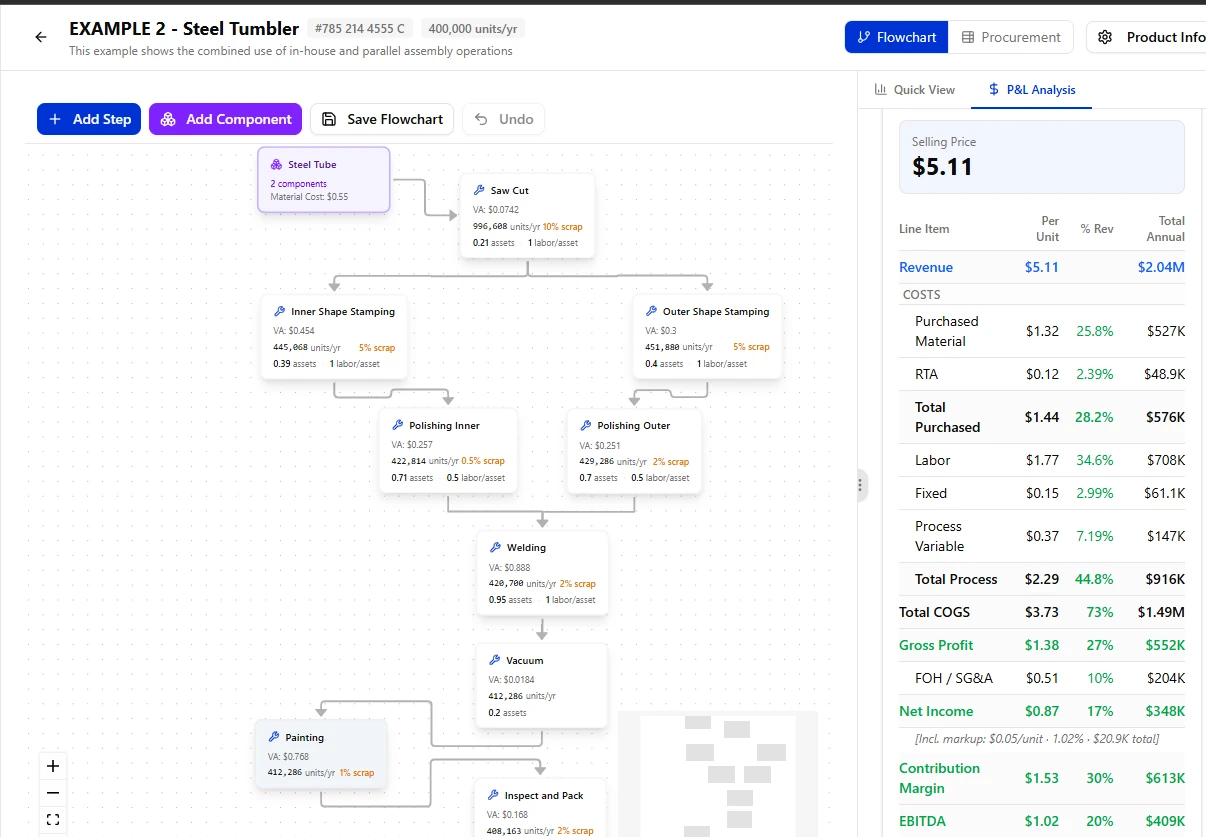
BoCoiQ is visual by design. You build the cost the way the part is made, so you can see and understand every step of what you are costing.
Map the process
Add components and steps to a visual flowchart: material cost, operations, scrap rate, volumes, assets and labor per asset. In-house and parallel operations sit in the same flow.
Roll up the cost
BoCoiQ carries volume and scrap through every step, then totals purchased material, labor, fixed and variable process cost into COGS.
Set the price
Choose one of six pricing methods, set the target, and read the selling price, gross profit, net income, contribution margin and EBITDA, per unit and per year.
See it, understand it
Every part is a flowchart you can read at a glance: each operation, how material moves from step to step, and where cost is added. Anyone on the team can follow the estimate and question it, not only the person who built it.
Model any task, your way
BoCoiQ is hyper-flexible and adapts to your needs, not the other way around. Machining, stamping, welding, assembly, coating, inspection, packaging or an outside service: add any operation with your own steps, assets, rates and assumptions. If you can describe the task, you can cost it.
Parallel branches, made easy
Split a flow into parallel branches and merge them again, like inner and outer shells stamped and polished side by side before welding. Volumes and scrap carry through each branch on their own. This is usually hard to model in spreadsheets and other costing tools; in BoCoiQ it takes a few clicks.
Pricing methods
Six ways to set the price
Every company prices a little differently. Choose the method your business already uses, set the target, and BoCoiQ calculates the selling price with the full P&L behind it.
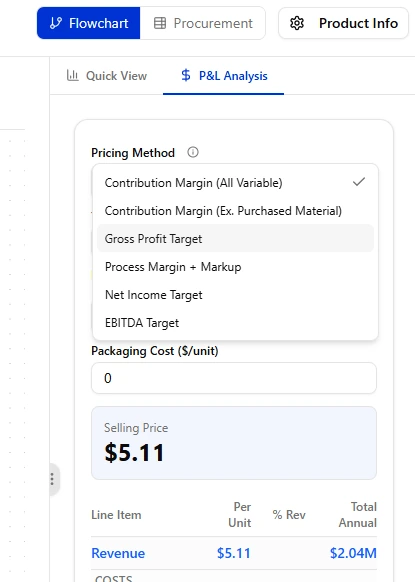
Contribution Margin (All Variable)
Price so that revenue minus every variable cost, purchased material included, meets your contribution margin target.
Contribution Margin (Ex. Purchased Material)
The same target with purchased material left out of the margin base, so margin is earned on the work you do, not on parts you buy.
Gross Profit Target
Price for a target gross profit after the full cost of goods sold.
Process Margin + Markup
A margin on your in-house process cost plus the markups set on purchased items, services and tooling.
Net Income Target
Price for the bottom line, after factory overhead and SG&A are covered.
EBITDA Target
Price for a target EBITDA, the figure owners and lenders often track.
Packaging cost per unit can be added on top of any method.
Already selling it? Check what it really earns.
BoCoiQ works on the products you sell today, not only on new quotes. Model a current product with its selling price and see the margin it actually earns, from purchased material down to net income. Find the parts that quietly lose money before the next price review or contract renewal.
Procurement
What you buy, tool and invest, in one view
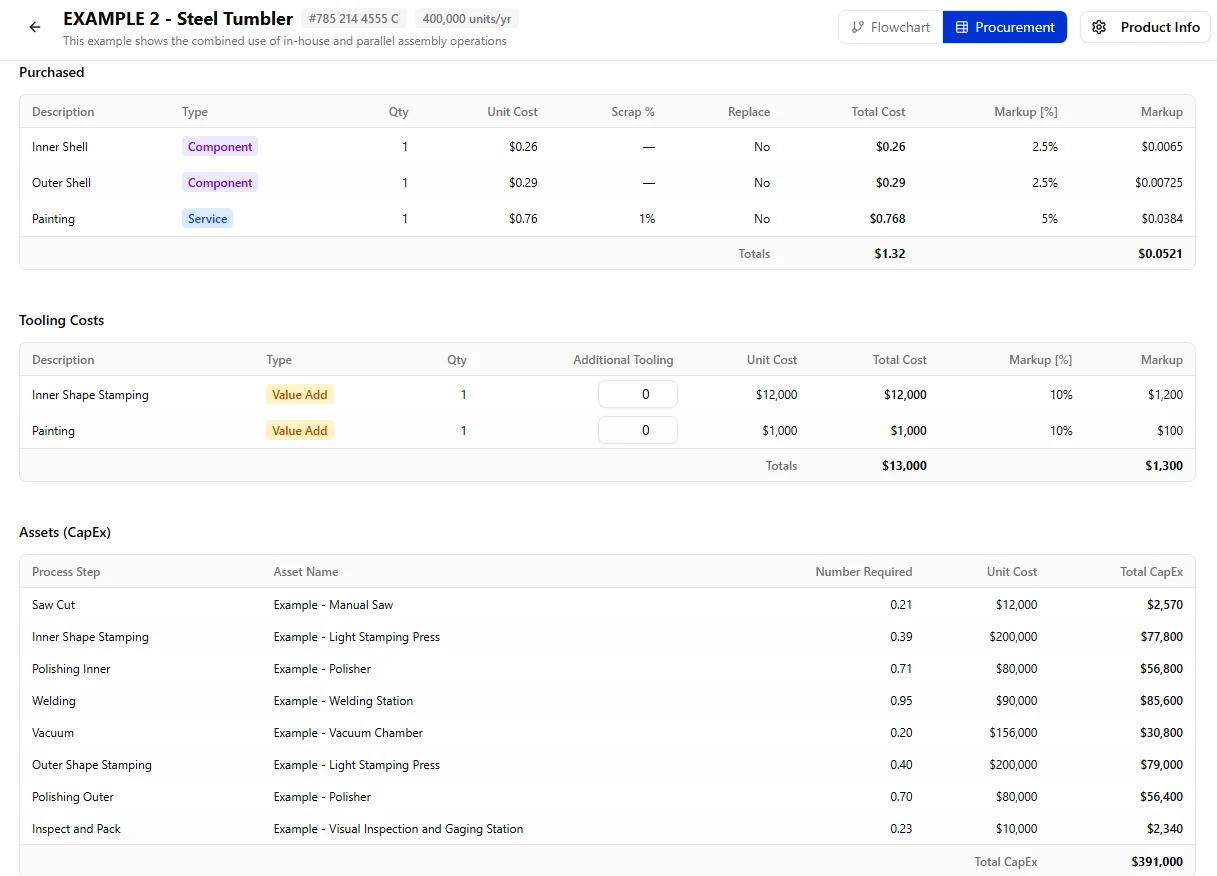
The procurement view sits next to the flowchart. It lists everything the part needs from outside, the tooling to make it, and the equipment each step requires, with markup set line by line.
$1.32per unit
Purchased items
Components and outside services with quantity, unit cost, scrap rate and a markup on each line.
$13,000tooling
Tooling
Tooling for each value-add step, room for additional tooling, and a markup to recover it in the price.
$391,000CapEx
Assets (CapEx)
The equipment each process step needs: how many, unit cost and total capital, step by step.
Who it's for
Manufacturers from $5M to $5B
Large enough that a pricing mistake is expensive, varied enough that one spreadsheet can't hold every part. BoCoiQ gives everyone who touches a quote the same numbers.
- Estimators and cost engineersBuild a flow once, then duplicate and adjust it to price the next part.
- Sales and bid teamsQuote with a price you can explain line by line.
- Finance and controllersOne costing method across products, with the P&L behind each price.
- LeadershipSee margin at the target before a deal is signed.
Features
What's inside BoCoiQ
Visual flowchart editor
Add steps and components, connect them, and save the flow. Undo keeps experiments safe.
Parallel operations
Split and merge process branches for assemblies, like inner and outer parts that meet at welding. Hard in spreadsheets, simple here.
Scrap and volume, step by step
Each operation shows its own units per year and scrap rate, so losses land where they happen.
Assets and labor
Assign assets and labor per asset to every operation and see what each step adds to cost.
P&L analysis
Per unit, percent of revenue and annual totals, from purchased material down to contribution margin and EBITDA.
Procurement view
Purchased items, tooling and CapEx next to the flowchart, each with its own markup.
Price new products in minutes
Most new parts look a lot like ones you already make. Duplicate an existing pricing model, change what is different (a material, an operation, the volume) and the new price is ready, with no need to rebuild the flow from scratch.
Request a demo
See BoCoiQ on one of your parts
Tell us a little about your company and we'll get in touch to set up a walkthrough.
Contact
Talk to us
Questions about BoCoiQ, pricing or a demo? Email or call us.